Component lifecycle
This guide covers how the lifecycle of a component works after the component's JS and CSS has been loaded. For in-depth information about how SALVO-TS decides which components to load and when, check out the component loading details.
Component creation
Components are implemented as ES classes extending HTMLElement, as such they inherit the behaviors of both:
- Whenever an instance of a component is created, it's
constructor()is run. - Instances can only be created via
document.createElementor via setting HTML (i.e.innerHTML = '...').- Trying to use
new MyComponent()will result in an error, just likenew HTMLDivElement().
- Trying to use
In your component's constructor() you should perform any setup which doesn't require access to props or refs, and which should be performed regardless of whether the component appears in the document.
In practice, try to avoid complex side-effects in your constructor() - use it to prepare services or perform setup internal to that component - for instance, creating a custom Axios instance.
Init
The init() method is called every time your component is inserted into the document:
- Props and refs are available and populated.
- The component's parent element is set.
This is where you should normally perform most of your component setup:
- Attach event listeners (preferably using
$subscribeor$listen). - Update the component's content based on it's props or refs.
- Query for any dependant components or elements on the page.
src/components/ExampleItem.tstsinit () {// Add event listeners, use refs and propsthis.$listen (this.sayHelloButton , 'click', () => this.showMessage (this.greeting ));// Init third-party components/librariessmoothscroll .setup (this.container );// Start intervals/timers etcthis.intervalHandle =setInterval (() => {// ...}, 1000);// Start observers etc.this.observer = newMutationObserver ((mutations ) => {// ...});this.observer .observe (document .body , {attributes : true,});}
src/components/ExampleItem.tstsinit () {// Add event listeners, use refs and propsthis.$listen (this.sayHelloButton , 'click', () => this.showMessage (this.greeting ));// Init third-party components/librariessmoothscroll .setup (this.container );// Start intervals/timers etcthis.intervalHandle =setInterval (() => {// ...}, 1000);// Start observers etc.this.observer = newMutationObserver ((mutations ) => {// ...});this.observer .observe (document .body , {attributes : true,});}
Destroy
The destroy() method is called every time your component is removed from the document:
- Props and refs are populated, but refs might point to elements which have also been removed.
- The component will not have a parent element.
This is where you should tear down your component and reverse any side-effects:
- Remove any event listeners created without using
$subscribeor$listen. - Stop any timers or intervals.
src/components/ExampleItem.tstsdestroy () {// Destroy third-party components/componentssmoothscroll .teardown (this.container );// Stop intervals/timers etcif (this.intervalHandle ) {clearInterval (this.intervalHandle );this.intervalHandle = null;}// Stop observers etc.if (this.observer ) {this.observer .disconnect ();this.observer = null;}}
src/components/ExampleItem.tstsdestroy () {// Destroy third-party components/componentssmoothscroll .teardown (this.container );// Stop intervals/timers etcif (this.intervalHandle ) {clearInterval (this.intervalHandle );this.intervalHandle = null;}// Stop observers etc.if (this.observer ) {this.observer .disconnect ();this.observer = null;}}
Lifecycle diagram
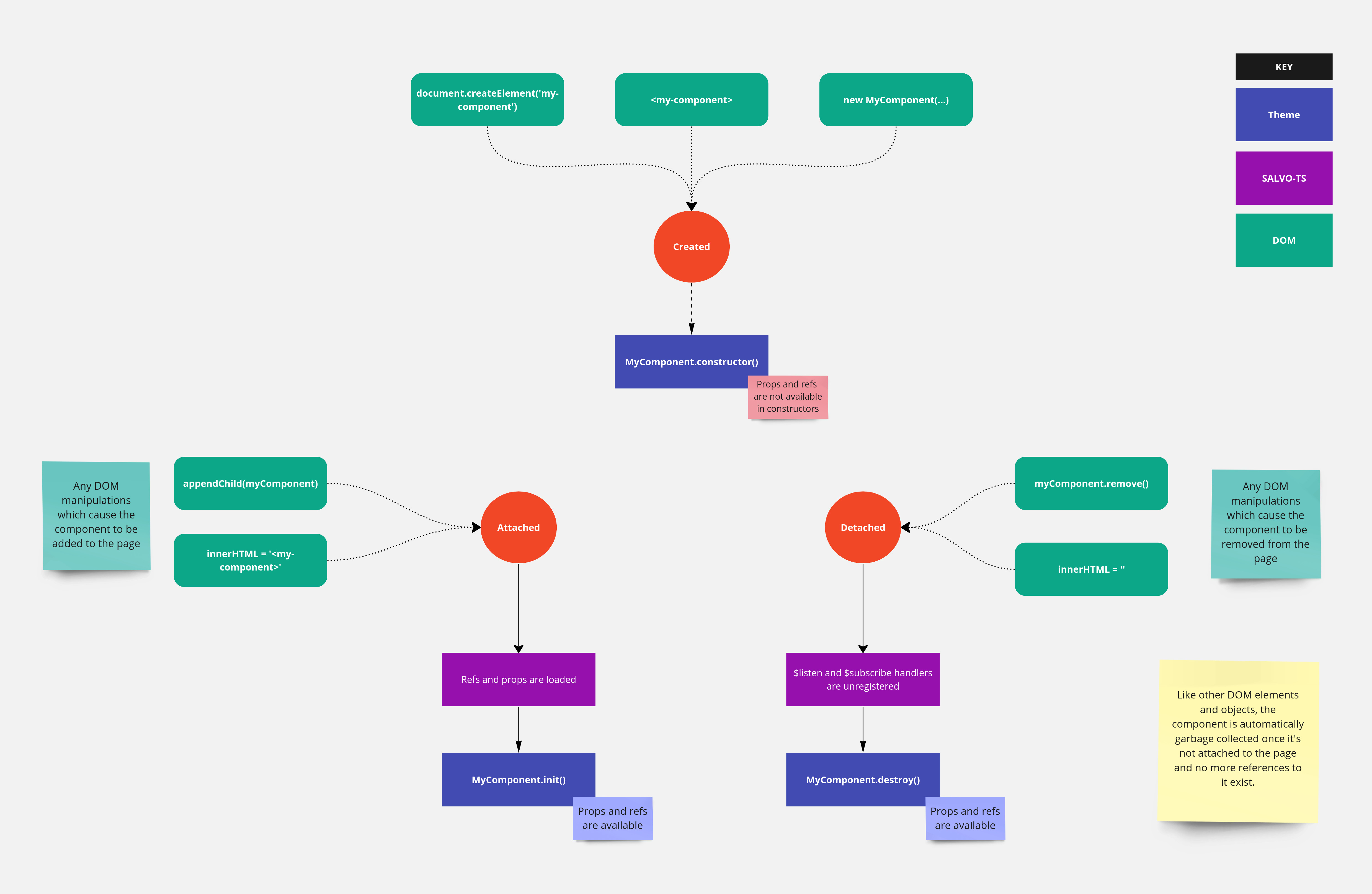
This diagram doesn't show any internal lifecycle steps, such as the process for populating props and refs. Check out the in-depth docs for more detail.